Bill Pay
Water and Sewer Bill Pay - Click here
- Note Water/Sewer Bills can still be paid by mail or in person -
How to Register for AccuFund Payment Portal
If you’ve received your utility statement and are ready to register for online payments, follow these steps:
Step-by-Step Registration Instructions
1. Go to the Payment Portal URL
https://www.villageofellenville.com/wsbillpay
2. Click the “Register” Button

On the login page, select the Register button to begin creating your account.
3. Fill Out the Registration Form
In the Create a login to access your account window, enter the following information:
- Username: Choose a username or look up your existing one.
- Adding a Payment MethodEmil: Enter your email address.
- Password: Create a new password.
- Confirm Password: Re-enter the password to confirm.

4. Select Your Statement Type
From the I have a(n)… dropdown, choose Utility Statement.
5. Enter Account Details from Your Statement
Locate your utility statement and enter the following:
- Account Number: As shown on your statement.
- Service Location Number: Also found on your statement.
Note: Your utility statement should clearly display both the Account Number and Service Location Number to help you complete this step
6. Click “Register”
Once all fields are filled out, click the Register button at the top of the window to complete your registration.
How to View Statements and Make Payments
Once registered, you can manage your utility payments and view your statements online:
Viewing Utility Statements:
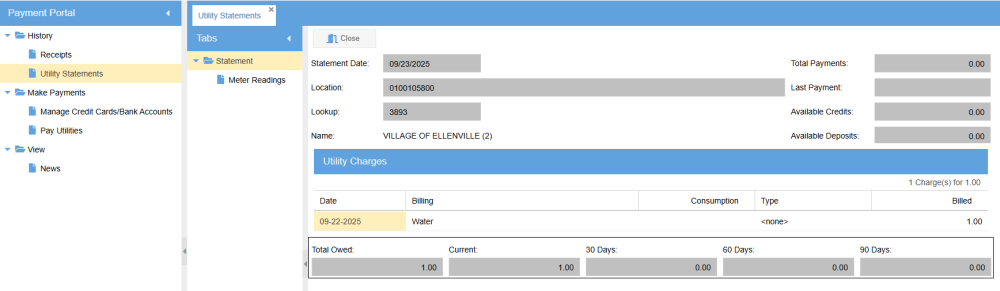
- Navigate to the History tab to view your past and current utility statements in an online format.
Adding a Payment Method
To make payments, you’ll first need to add a credit card or bank account:
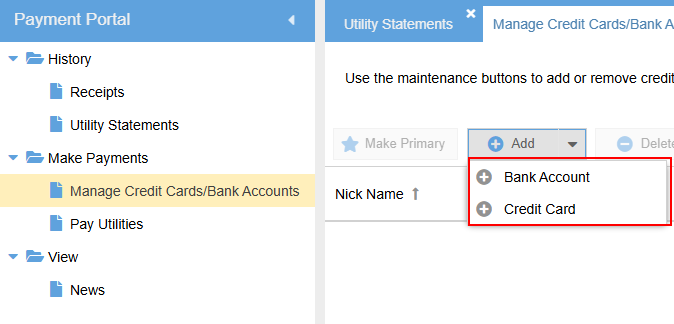
- Go to the Make Payments folder.
- Select Manage Credit Cards/Bank Accounts.
- Click the Add dropdown and choose the payment method you'd like to add.
- Follow the on-screen prompts to enter your payment details.
- Once completed, your payment method will be active and visible
Making a Payment
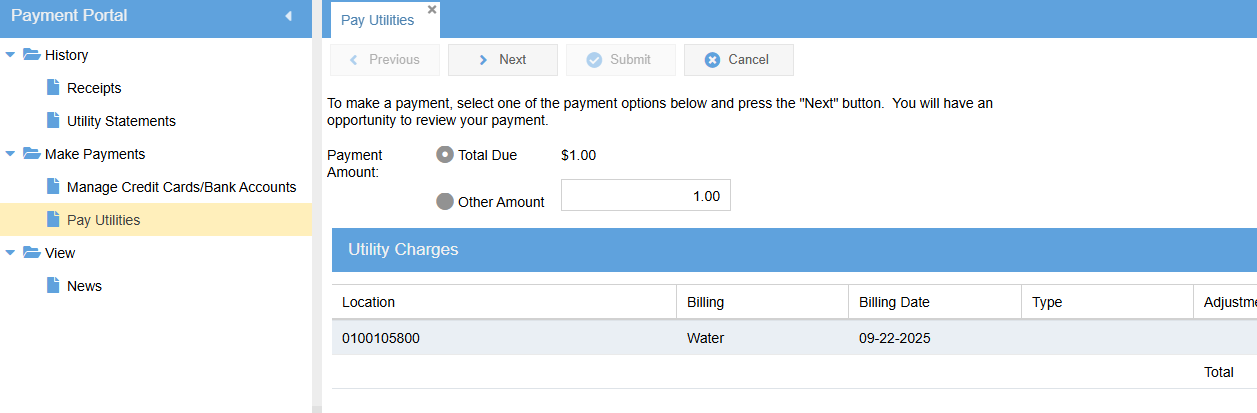
- Under the Make Payments folder, select Pay Utilities.
- The portal will display the total amount due.
- Follow the prompts to select your preferred payment method and complete the transaction.